Install the Mac app
RH Monitor lives quietly in your menu bar, so status is visible without another dashboard tab.
Use the free status dot to know when work appears available. Upgrade to Tracker Pro when you want local hours, history, paid vs actual time, earnings, charts, and CSV export.
March 14, 2024
Free: a tiny menu bar dot tells you when work appears available. Pro: track private history, AET, and earnings.
A short guided setup turns RH Monitor into a quiet Mac companion for checking status and keeping your own records.
RH Monitor lives quietly in your menu bar, so status is visible without another dashboard tab.
Plain-language onboarding helps connect your browser locally. No RH Monitor account is required.
The free dot shows whether work appears available and gives you a quick RaterHub shortcut.
Tracker Pro adds AET, paid vs actual time, earnings, charts, editable history, and CSV export.
RH Monitor is useful as a free status companion. Tracker Pro is for raters who want a private record of what they worked, what it paid, and how actual time compares with AET.
Basic status awareness.
Private work tracking.
Status, timing, and work history are separated clearly: the free companion stays simple, while Tracker Pro keeps the detailed record.
A small menu bar dot keeps availability visible while you stay focused on other work.
If a task shows 8–9 minutes, RH Monitor treats 8:00 as the target and 9:00 as paid time, then compares that with your actual time.
Keep local history for your own review, corrections, trends, and CSV export when you need it.
Keep a small status signal visible, step away when there is no work, and open the tracker only when you want records.
A tiny red or green dot shows task status without interrupting your workflow.
See whether your real work time is above, below, or close to the paid estimate.
Use your hourly rate and currency to estimate daily and weekly earnings.
Edit your local history when needed, review trends, and export clean CSV records.
RH Monitor is built to keep your work data local. It does not send task content, task screenshots, cookies, task IDs, or account data to external services.
Keep the menu bar minimal, then open RH Monitor when you want the full work picture.
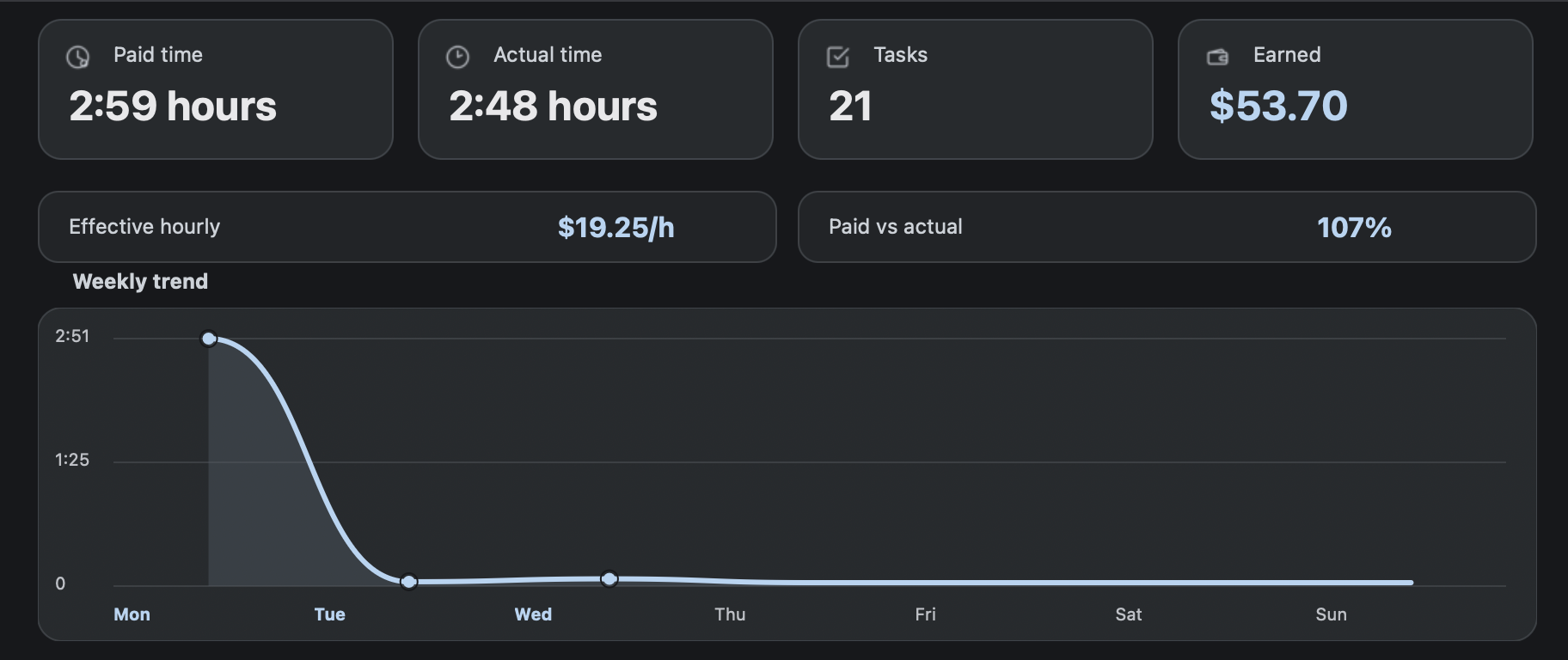
Track paid time, actual time, tasks, earnings, trends, and sessions in one private dashboard.
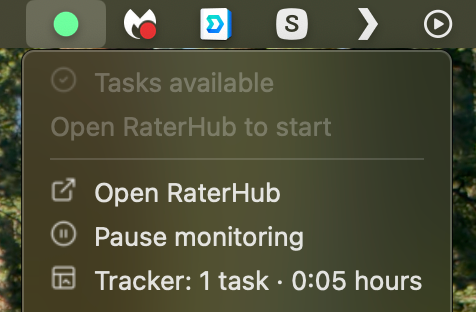
A tiny menu bar signal and compact dropdown show whether work is available, with quick access to RaterHub and monitoring controls.
Guided onboarding uses plain language like connection — not technical setup terms.
If you step away from your Mac, optional mobile and Discord notifications can carry the smallest possible status signal: YES, NO, LOGOUT, or SLEEP.
A simple phone status view can show whether work appears available and when RH Monitor last checked, without sending task content or account data.
Optional Discord notifications are useful during long waiting periods: keep the message low-information and use your channel as a quiet availability feed.
Short answers for the questions that matter before downloading or upgrading.
Yes. The free plan includes the menu bar status dot, local browser connection, and Open RaterHub shortcut.
No. RH Monitor is an independent product. Use it only if allowed by your work or platform rules.
RH Monitor is designed to keep work history local. It does not send task content, task screenshots, cookies, task IDs, or account data externally.
No. RH Monitor is a tracking and status companion. It does not submit tasks, complete ratings, or change task content.
Tracker Pro unlocks work history, AET, paid vs actual time, earnings, charts, editable history, task wrap-up reminders, and CSV export.
The Lemon Squeezy receipt includes the license key. Download the Mac DMG from the download page, install RH Monitor, then paste the key inside the app.