Quick answer
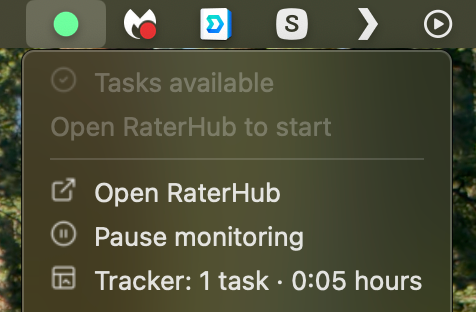
A Mac menu bar RaterHub tracker is useful when you want status awareness without another full window. RH Monitor shows the live signal in the menu bar and keeps the detailed work history in a local Mac app.
| Fit | Use this page to decide |
|---|---|
| Best for |
|
| Not for |
|
Small surface, useful signal
The status dot can tell you whether tasks appear available, no tasks are visible, you are logged out, sleep hours are active, or an active task is near its ready state.
That signal is intentionally small. You should not need a large dashboard just to know the current status.
Open details only when needed
When you want more than the dot, open the Tracker window. Tracker Pro shows task count, paid time, actual time, earnings, charts, editable history, and CSV export.
This keeps the app out of your way during focused work while still making records available when you need them.
Built for nontechnical use
The UI avoids technical language where possible. Users should think in terms of connection, notifications, sleep hours, and tracker history rather than ports or scripts.
That consumer-grade approach matters because time tracking should reduce friction, not add another technical project.
A companion, not a work-completion tool
RH Monitor does not submit tasks, complete ratings, or change task content. The menu bar dot is a status and timing companion only.
That boundary makes the app easier to explain and safer to use within allowed work rules.
Status legend and daily rhythm
The menu bar workflow is built around quick interpretation. Green or positive status means tasks appear available, neutral status means no tasks are currently visible, logout means the connection sees a signed-out state, and sleep means your optional sleep-hours window is active. Active-task timing colors are local timing hints, not instructions to the work page.
A normal day can stay simple: glance at the dot, open RaterHub through your normal authorized path, work as usual, then open Tracker Pro later for history. This rhythm is the reason RH Monitor uses a native menu bar surface instead of asking you to keep a full page open all day.
The menu bar choice also helps users who work across multiple windows. Even when the browser is covered, minimized, or on another desktop, the tracker status remains in the macOS system area. That makes the signal feel less like a webpage and more like a quiet work companion.
Comparison and decision table
| Dot/status | Meaning | Action |
|---|---|---|
| Available | Tasks appear visible. | Decide whether to open your work page. |
| No tasks | No tasks currently visible. | Check later or follow your normal workflow. |
| Logout | Connection reports logged-out state. | Sign in through your normal authorized path. |
| Sleep | Sleep hours are active. | Monitoring is intentionally quiet. |
| Task-ready | Current task reached local ready/due state. | Use your own judgment; RH Monitor does not act on the task. |
Trust signals and source of truth
RH Monitor’s SEO guides are written from the product’s actual feature boundary: private Mac menu bar status, local Tracker Pro history, paid vs actual time, earnings, CSV export, and no task-content storage.
FAQ
Why use the Mac menu bar?
It gives a small persistent signal without keeping another dashboard open.
Can I open a full tracker dashboard?
Yes. Tracker Pro includes the dashboard, history, charts, editing, and CSV export.
Does the dot show task content?
No. It shows status, not task text.
Can sleep hours be disabled?
Yes. Sleep hours are optional and default off.
Is RH Monitor independent?
Yes. It is not affiliated with RaterHub, Google, TELUS, or any rating platform.