
Quick answer
A RaterHub Chrome extension alternative should answer one question: can you track status and time without turning the browser into your main dashboard? RH Monitor’s answer is yes for Mac users, while keeping a clear passive tracking boundary.
| Fit | Use this page to decide |
|---|---|
| Best for |
|
| Not for |
|
Why look beyond a browser tracking tool
Browser tools can be convenient because they are close to the work page. The downside is that they also live in the same place you are trying to focus. Some users prefer the timer and history to be separate from the browser tab.
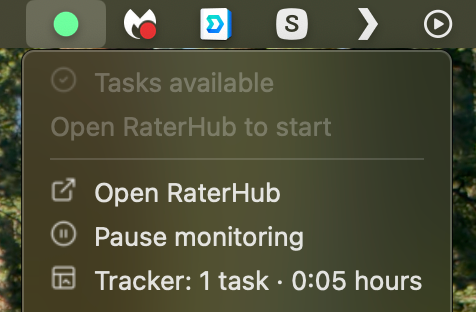
RH Monitor still uses a browser connection for status, but the normal experience is a Mac menu bar dot plus a local app dashboard. That keeps the work tab cleaner.
Privacy and permission differences
When comparing any browser tool, read its permissions and storage model. Ask what it sees, what it stores, whether data leaves your device, and whether it stores task content.
RH Monitor’s public boundary is narrower: no task content, no screenshots, no browser URLs in tracker history, and local-first work records. External notifications stay low-information.
When a browser extension is fine
A browser extension may be the right choice if you want everything inside the browser and you are comfortable with its permissions and data model. Some users prefer a single browser surface.
The alternative is not about saying every extension is bad. It is about giving Mac users a cleaner local workflow when they want one.
Permission and storage questions to ask
When comparing a Chrome extension alternative, do not stop at the feature list. Ask where the data lives, whether the tool needs broad browser access, what happens to history, and whether you can export your own records. Also ask whether the product clearly says it is a tracker rather than a task-completion tool.
RH Monitor’s model is easier to evaluate because the persistent tracker is a Mac app. The browser connection is there for status, while history, charts, settings, and exports live in the desktop workflow. For users who prefer a clean separation between browser work and personal records, that difference is the point.
Comparison and decision table
| Surface | Strength | Tradeoff | Choose when |
|---|---|---|---|
| Browser extension | Close to the work page. | Depends on extension permissions and browser UI. | You prefer browser-first tools. |
| Bookmark/manual timer | Simple and lightweight. | Limited history and export. | You only need basic timing. |
| Spreadsheet | Fully manual and portable. | Easy to forget during work. | You want free manual control. |
| RH Monitor | Mac menu bar status plus local history and CSV. | Mac-focused app. | You want private desktop tracking. |
Competitor-neutral comparison checklist
Use the same checklist for any tracker you compare. The point is not to copy another tool’s feature list; it is to choose the storage model, workflow surface, and boundary that fit your work rules.
| Question | Why it matters | RH Monitor answer |
|---|---|---|
| Where does the main surface live? | Browser tools stay near the work tab; desktop tools separate work from records. | Mac menu bar status plus local Tracker window. |
| What gets stored? | A tracker should not need task content to produce useful records. | Work metadata: status, task count, paid time, actual time, earnings, sessions, CSV. |
| Can I export? | Export makes your history portable and reviewable. | CSV export in Tracker Pro. |
| Can mistakes be corrected? | Real work logs need editing without deleting the whole history. | Editable local history in Tracker Pro. |
| What does it never do? | The product boundary should be obvious before install. | Does not submit tasks, complete ratings, or change task content. |
Trust signals and source of truth
RH Monitor’s SEO guides are written from the product’s actual feature boundary: private Mac menu bar status, local Tracker Pro history, paid vs actual time, earnings, CSV export, and no task-content storage.
FAQ
Is RH Monitor a Chrome extension?
No. RH Monitor is a macOS menu bar app with a browser connection for status updates.
Why use a Mac app instead of a browser extension?
A Mac app can keep the persistent status and history outside the browser, which some users find calmer and easier to trust.
Does RH Monitor read task content?
No. It is designed around status and time metadata, not task text or screenshots.
Can it export CSV?
Yes. Tracker Pro includes CSV export for local history.
Does it work without Chrome?
The current browser connection flow is designed around the supported setup. The app itself is native macOS.