
Quick answer
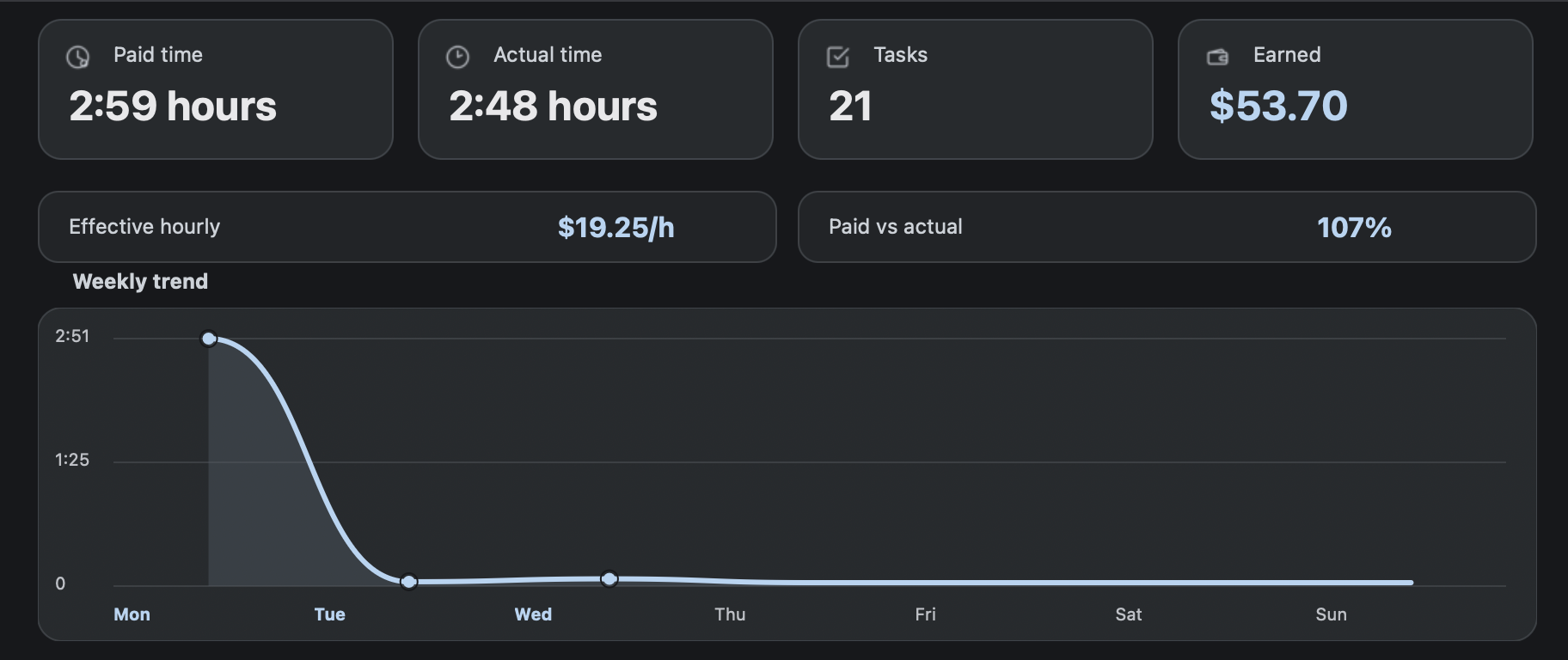
A RaterHub earnings tracker should be transparent: paid hours multiplied by your saved hourly rate equals estimated earnings. RH Monitor uses that simple model while keeping the underlying work history local on your Mac.
| Fit | Use this page to decide |
|---|---|
| Best for |
|
| Not for |
|
Earnings connected to sessions
Earnings estimates are easier to trust when you can see the sessions behind them. RH Monitor connects estimated earnings to task count, paid time, and history rather than showing a disconnected total.
If a number looks wrong, editable history makes it possible to correct the local record instead of throwing away the whole day.
Hourly rate and currency support
You can save an hourly rate and currency so RH Monitor can estimate earnings from paid time. If your rate changes, update the setting before reviewing new work periods.
Currency support is meant for display and records. If you need tax, invoice, or exchange-rate treatment, keep a separate official process.
Formula and example
The formula is simple: paid time in hours × hourly rate = estimated earnings. If you record 3.25 paid hours at 19.25 USD/hour, estimated earnings are 62.56 USD.
Actual time still matters. A session can have the same estimated earnings but feel very different depending on how much actual time it took.
CSV export for your own records
Tracker Pro CSV export lets you move local history into a spreadsheet, backup, or review process. That is useful for monthly summaries and for checking your own numbers against whatever official process you use.
The export is a private record, not a replacement for your required reporting system.
Monthly review workflow
Estimated earnings become more useful when you review them on a schedule. At the end of a week or month, compare paid time, actual time, task count, and estimated earnings. Then export CSV if you want a spreadsheet copy or need to compare your private records with another system.
Do not treat any estimate as a final pay statement. Rates, reporting rules, currencies, and official records can differ. RH Monitor is designed to make your own work history clearer, not to replace your required reporting or payroll process.
For many users, the earnings view is most valuable as a planning aid. It can show whether a day is roughly on track, whether a week was lighter than expected, and whether paid time lines up with the work you remember doing. That context is the product value.
Comparison and decision table
| Metric | Example | Meaning |
|---|---|---|
| Paid time | 3.25 hours | Time used for earnings estimate. |
| Hourly rate | 19.25 USD | Your saved planning rate. |
| Estimated earnings | 62.56 USD | Paid hours × hourly rate. |
| Actual time | 3.50 hours | How long the session really took. |
| Task count | 18 | Volume behind the total. |
Trust signals and source of truth
RH Monitor’s SEO guides are written from the product’s actual feature boundary: private Mac menu bar status, local Tracker Pro history, paid vs actual time, earnings, CSV export, and no task-content storage.
FAQ
Are earnings exact?
No. RH Monitor shows estimates based on your saved hourly rate and paid-time records.
Can I change currency?
Yes. RH Monitor supports SEK and USD display for tracker records.
Does actual time affect earnings estimates?
The estimate is based on paid time. Actual time helps you understand pace and efficiency.
Can I export earnings?
Yes. Tracker Pro includes CSV export with earnings-related fields.
Should I use this as my official pay record?
No. Use RH Monitor as a private companion record and follow your official process for reporting and pay.