Quick answer
A Search Quality rater time tracker should help with your own records: work hours, task counts, estimates, actual time, and exportable history. RH Monitor does that for RaterHub-style workflows on macOS while keeping task material out of the tracker.
| Fit | Use this page to decide |
|---|---|
| Best for |
|
| Not for |
|
Designed around rating sessions
Rating work often happens in sessions rather than a single uninterrupted day. A useful tracker should show when sessions happened, how many tasks were completed, and what paid versus actual time looked like.
RH Monitor groups local history so you can review your day without reconstructing it from memory.
Work hours with AET context
Generic work-hours apps track clock time. Rater-style work also needs AET or paid-time context. RH Monitor keeps those numbers separate so your record can show both the estimate and your actual working time.
That makes the tracker more useful than a plain timer for this specific workflow.
A dashboard after the work, not during it
The dashboard is for review. During work, the menu bar status is enough for most moments. This keeps the app from becoming another screen competing with the task page.
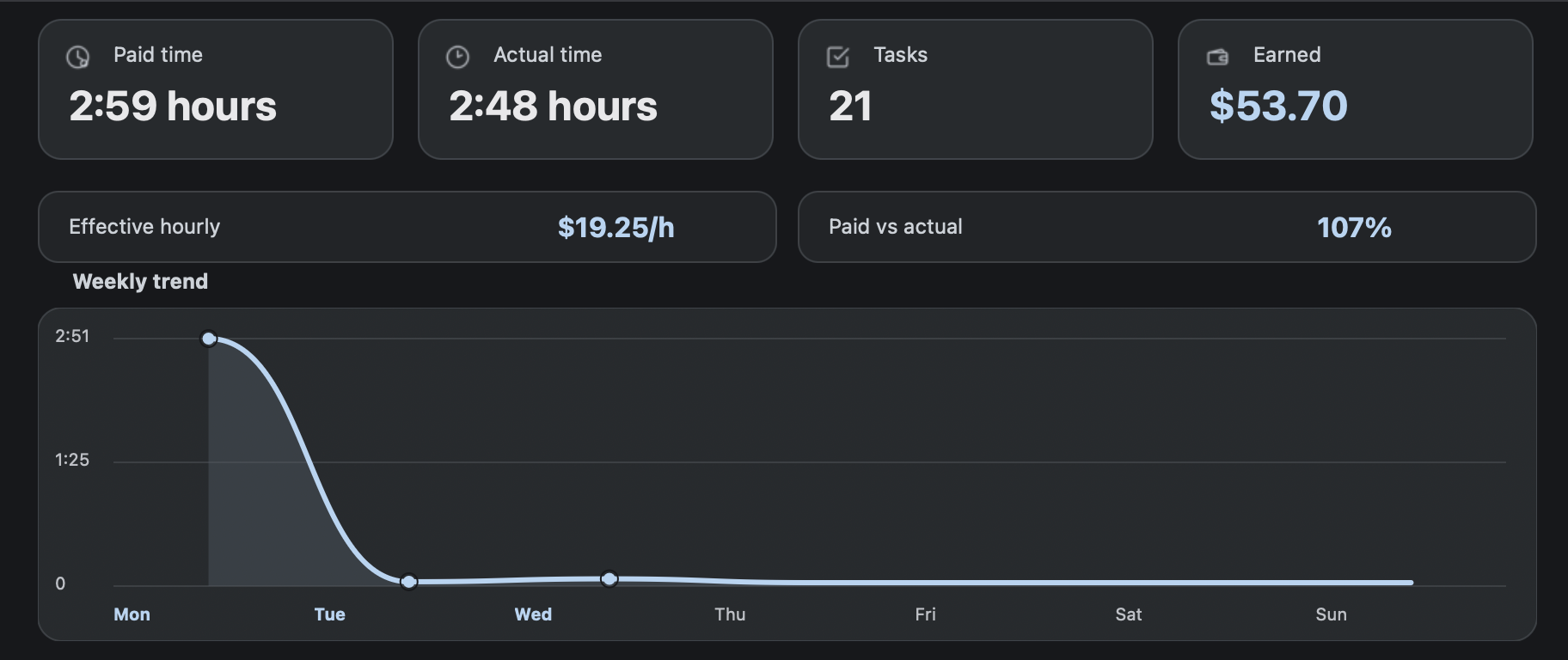
When you are ready, open the Tracker window for task counts, paid time, actual time, earnings, charts, and CSV export.
Use it within your rules
RH Monitor is independent and should only be used if allowed by your work/platform rules. It does not replace official reporting, account access, or platform guidance.
It is a private companion for your own records.
Broader work hours with a clear scope
“Search Quality rater” is a broader phrase than “RaterHub time tracker,” so the scope should be clear. RH Monitor is not a universal platform for every rating workflow. It is built around RaterHub-style status and task timing on macOS.
That scope is a strength for the right user. Instead of a generic freelancer timer, you get paid versus actual time, task counts, AET-style context, estimated earnings, sessions, and CSV export. If those are the fields you need, the tracker matches the work better than a plain hour logger.
The broader work-hours page should therefore qualify users rather than over-promise. If your work uses RaterHub-style task timing and you use a Mac, RH Monitor may fit. If your workflow is completely different, use the comparison pages to decide before installing.
That keeps the guide useful for broader searches while still staying honest about scope.
Read the adjacent RaterHub-specific guides for the deeper implementation details.
Comparison and decision table
| Need | Generic work-hours tracker | RH Monitor |
|---|---|---|
| Session time | Yes. | Yes, with task context. |
| AET/paid time | Usually no. | Yes, paid vs actual time. |
| Task count | Usually manual. | Tracker Pro history. |
| Earnings estimate | Sometimes. | Hourly rate + currency + paid time. |
| CSV | Varies. | Tracker Pro export. |
Trust signals and source of truth
RH Monitor’s SEO guides are written from the product’s actual feature boundary: private Mac menu bar status, local Tracker Pro history, paid vs actual time, earnings, CSV export, and no task-content storage.
FAQ
Is RH Monitor only for Search Quality raters?
It is built around RaterHub-style rating workflows, especially where task timing and AET context matter.
Does it help with job applications or exams?
No. RH Monitor is a work-record companion, not a job, exam, or training product.
Can it track work hours?
Yes. Tracker Pro records paid time, actual time, sessions, and history.
Does it store task content?
No. It stores metadata for your records, not task text or screenshots.
Can I export my history?
Yes. Tracker Pro includes CSV export.